UNDER CONTROL: Tracking Home Construction

UX and UI for an AI-Powered Tool to Help Homeowners Control Budget and Schedule

Managing a self-construction project can drain your time, energy, and sanity. Common challenges include:

The problem: A dream home, A budget nightmare

Unexpected expenses

Schedule uncertainty

Multiple suppliers

Chaotic cash flow

Homeowners lack a simple, smart system dedicated to keeping budgets and schedules on track.

Current competitor tools: None is a perfect Fit

Loading..........

The Data is Not Available

Loading..........

The Data is Not Available

Research: Budget control & Schedule tracking Are the key Pain Points, (Findings of 20 Participants)

How would you rate your project’s Pain points (1-10)

No Data Found

How do you control your project?

No Data Found

How would you rate your project’s Pain points (1-10)

No Data Found

How do you control your project?

No Data Found

Persona: “The Balance Keeper

“Is it worth spending or is it smarter to save?”

Samuel

Remodeling his apartment. His wife leads the design, while he takes care for the finance side of the project.

Pain Points
1. balancing budge vs. design.
2. Hard to oversee project’s budget, schedule and payments.

Goals
1. Easier decision-making.
2. A clearer view of the project.

Insights: Simplifying the Home building Journey

Simple and Intuitive

1. Intuitive features

2. Easy navigation

3. Step-by-Step Process

Decision-Support Tools

1. AI-driven planning

2. Cost calculator

3. Comparison tools

Centralized Organization

1. Plans & Permits

2. Bids & Contracts

3. Orders & Invoices

User Journey: Meeting needs at every stage

Stage 1: Planning

Step 1: Architect’s Plans Permits

Need: Docs organizing

Step 2: Tasks breakdown. Budget Estimation

Need: know-how

Stage 2: Hiring

Step 1: Prices Offers Bids

Need: Decision-making

Step 2: Contracts

Need: Docs organizing

Stage 3: Building

Step 1: Tasks Update

Need: Full picture

Step 2: Schdule

Need: Timeline

Stage 4: Monitoring

Step 1: Payments Follow-up

Need: Cash-flow

Step 2: Budget Control

Need: Exceptions alerts

  1. Visual Tone: Soft and neutral color Emphasizes trust, efficiency, and clarity.
  2. Typography: Sans-serif fonts for readability and modernity.
  3. UI Components: Card-based layout For budgets, timelines, contractors and task breakdowns.
  4. Progress trackers / timelines: Visually engaging, showing milestones, budget used, time left.
  5. Data visualizations: Minimal but helpful charts and infographics.

Design Style: Modern and clean

  1. Concise and informative.

  2. Supportive and objective.

  3. Action-oriented.

  4. Formal tone with a human touch.

Microcopy Style: Professional and clear

Solution: A system guiding homeowners through construction

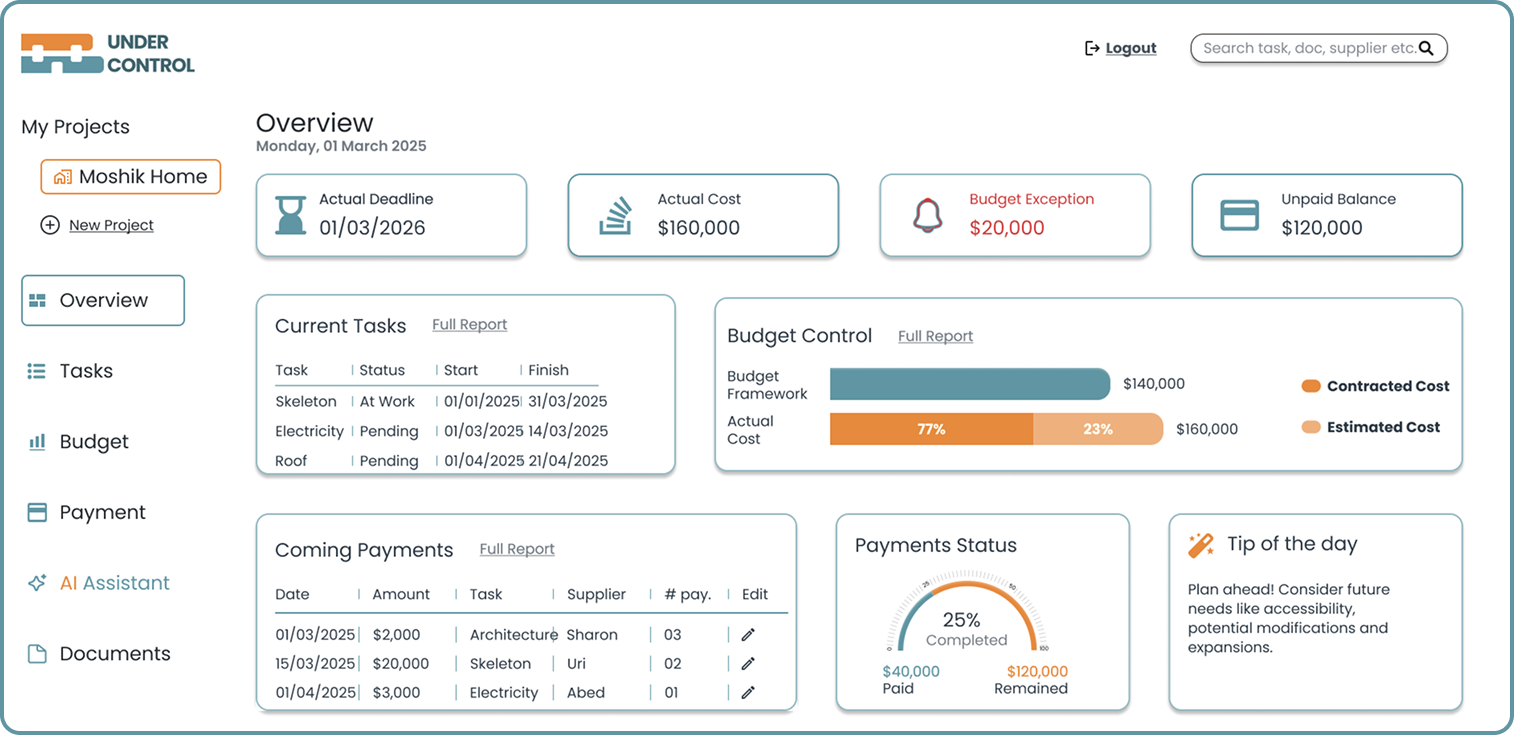
Dashboard

A comprehensive overview, displays Key Performance Indicators, Budget overruns, upcoming Tasks and Payments and other essential information.

AI Assistant

By filling out a questionnaire and entering project details, the system generates a complete breakdown of tasks, and estimated costs and timeline.

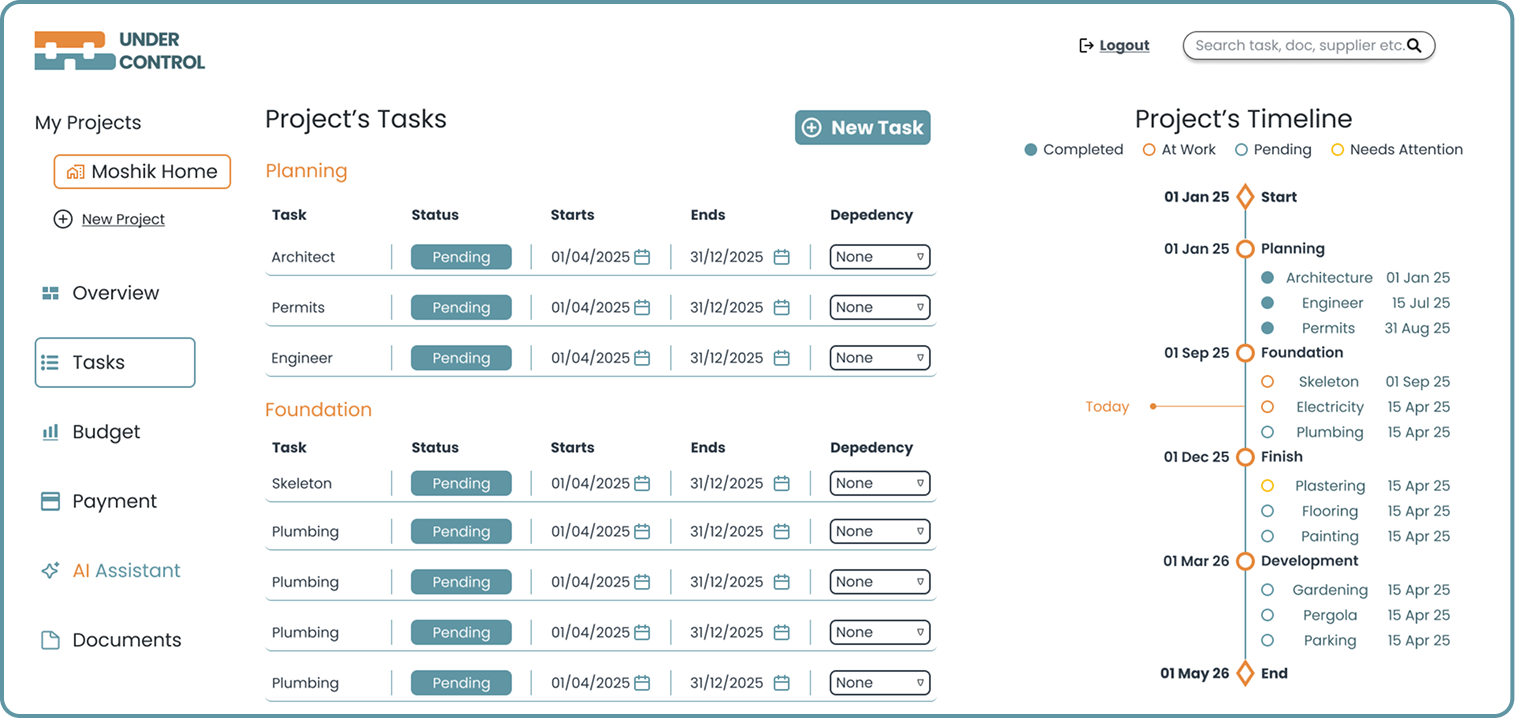
Tasks table & Timeline

After tasks are entered manually or via the AI Assistant, a detailed breakdown generates the project timeline

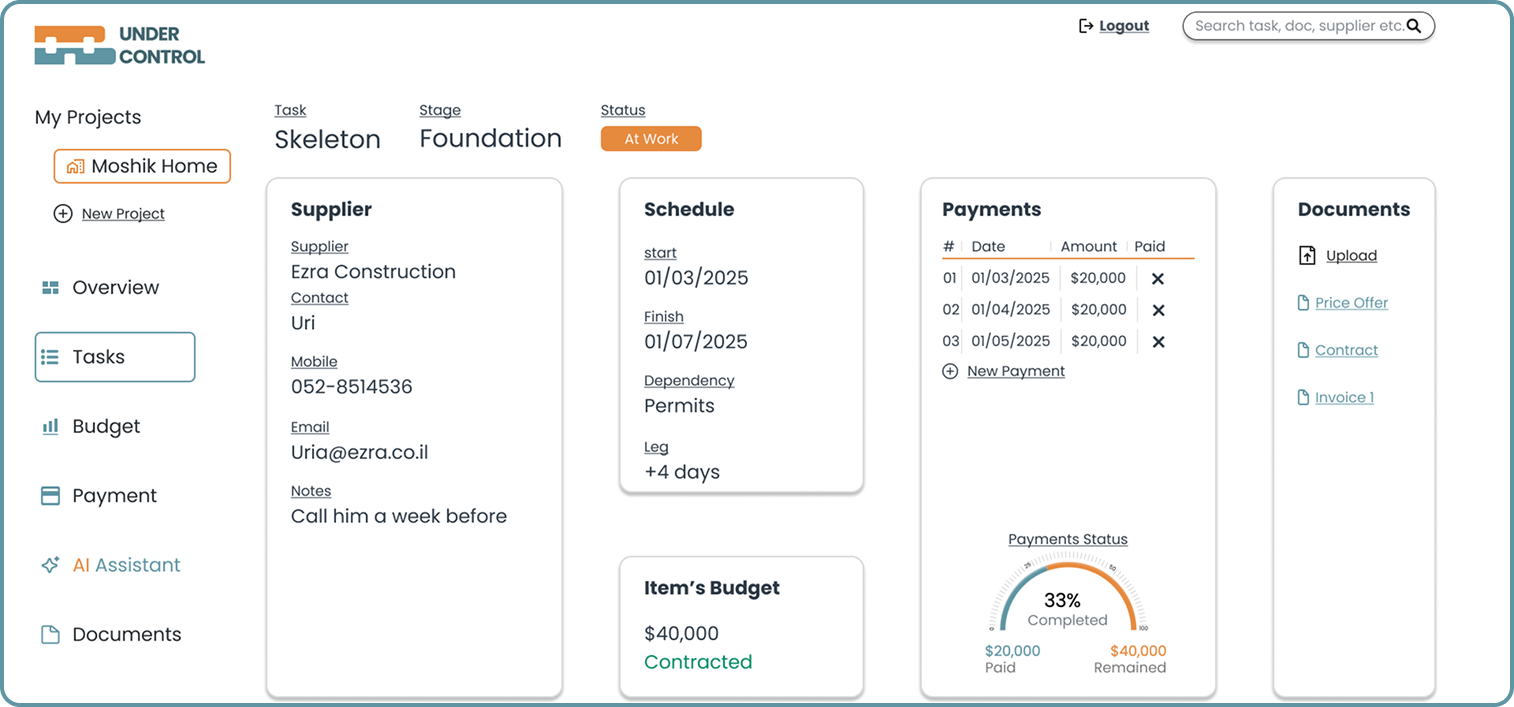
Task’s page

Each task has its own dedicated page with all its details and related documents.

Conclusion: Developing skills in complex system design

The project refined my ability to translate research insights into actionable features, balancing usability with AI-driven decision support, financial tracking, data visualization and system thinking.